We've added a helper for blurring secrets in the UI. For things like API tokens, it's helpful to hide them by default on page load and only reveal them when clicked.Screenshot 2024-06-18 at 9.41.13 AM.png20.8 KB
This is implemented without any JavaScript too! It uses CSS and the state of a hidden checkbox to hide & show the content.
Some APIs use Basic Auth for authentication. We've now added support for this which can be done by either providing credentials on initialize or overriding the basic_auth method in your client.
Rails 7.2 is almost here and we've updated Jumpstart Pro to the latest version and configurations so it'll be ready to use as soon as Rails 7.2.0 is released. 🎉
Rails 8 will include Kamal configuration out of the box and we've included that in Jumpstart Pro Rails applications. You can use the out of the box configuration to deploy Rails to your own servers using Kamal.
You can now invite multiple users to the Jumpstart Pro repository which is helpful if you're working with a team of developers on your project.
On your license page, you'll see the Allowed Users section now where you can add and remove GitHub users to your license. They will receive an invitation to the GitHub repository where they'll be able to participate with any issues, pull requests and discussions. Screenshot 2024-05-16 at 12.30.17 PM.png74.3 KB
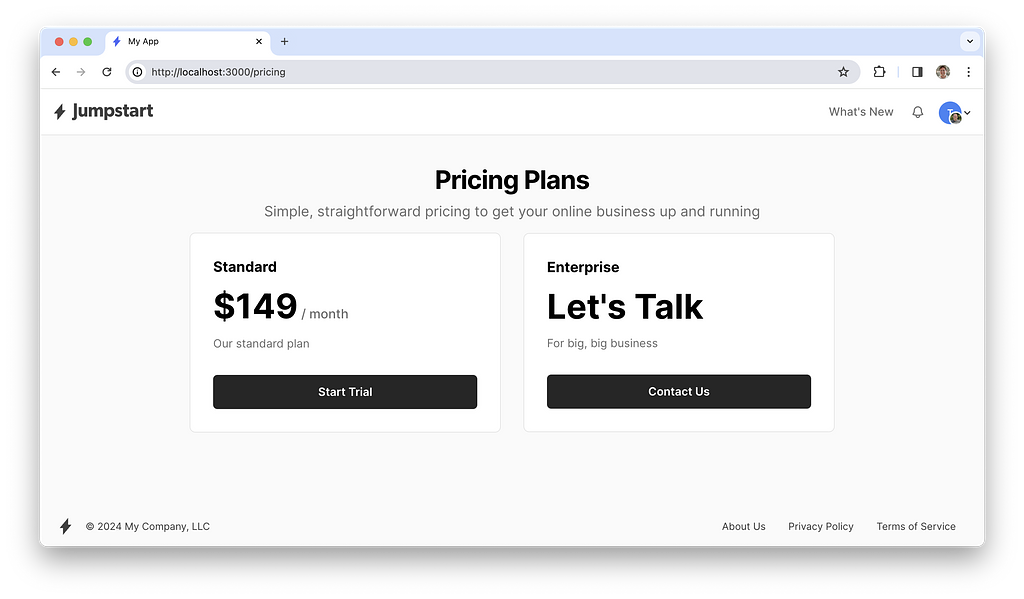
It's common to offer custom or enterprise plans in applications. You can now create plans with a contact URL that marks it as an enterprise plan. enterprise-plans.png259 KB
Your sales team can then create an appropriate plan in the admin and send it to the customer for checkout. The contact URL can be either a URL to a contact page or a mailto link for sending an email.
We're super excited about this update! Turbo's new version was announced at Rails World 2023 and showed off some great features for simplifying realtime updates in your Rails apps.
Here are the 3 main improvements:
Page refreshes with morphing.
View transitions.
InstantClick: faster page loads thanks to link preloading.
Morphs allow you to tell the page to request a new copy from the server and only the changes will be applied. A user can be viewing a page and will see updates without losing their place.
View transitions allow you to keep users in context when they're navigating around. Imagine you click on a video on the index page and it resizes to full-width when you click on it and navigate to the video.
Instant Click is another awesome feature that predicts links a user may click on. By preloading the page, a link click feels instant because it's already loaded.
You can now take advantage of all these improvements in your Rails applications. We've modified the scaffold generator to automatically include Turbo broadcasts out of the box.
We've just released dark mode support for Jumpstart Pro! Users can specify their preferred theme in their profile as System, Dark, or Light themes. When set to System, the theme will match the OS theme and change when the OS theme changes using a little JavaScript.
Jumpstart Pro now comes with a dark mode theme out of the box. Users can choose between using light, dark, or match the system theme.
We've updated the default views to include styles for the dark theme as well.
Dark mode is applied to the layout by adding the "dark" class. We've also added JavaScript to listen for changes to the system theme to keep it in sync.
Jumpstart Pro now ships with a built-in API client generator. You can use it to create your own API clients for integrations with any API you would like.
As developers, it's easy to reach for Rubygems, but each dependency we add makes it harder to maintain your application. We've found that we need to fork most API Rubygems to fix bugs or implement API features that aren't supported yet in the library.
Now, our default is to build an API client ourselves. It's easy to maintain, doesn't break from external changes, and only implements the features we need. We've made this available to Jumpstart Pro users to more easily take advantage of building their own API clients.
It's customizable so you can override the authentication or response parsers to work however you need.
You can generate an API client using the following command:
rails g api_client OpenAi
This will generate your API client and test file. You can then implement methods for API endpoints.
Here's an example integrating with the OpenAI API:
class OpenAiClient < ApplicationClient
 BASE_URI = "https://api.openai.com/v1"

 def models
   get("/models")
 end

 def completions
   post("/completions", body: {model: "text-davinci-003", prompt: "Say this is a test", max_tokens: 7})
 end
end
We're moving the forum for Jumpstart Pro over to Discord and the GitHub repositories. We recommend using the GitHub Discussions so other people can find your questions and answers, but Discord is also a great option if you need some quick help on anything. 👍
We've renamed the master branch to "main" now for Jumpstart Pro Rails. This matches the iOS and Android repos as well as GitHub's default branch naming.
To update your local clones, you can run the following:
git branch -m master main
git fetch origin
git branch -u origin/main main
git remote set-head origin -a


.png)